# Python
# Batch Iterating in Pandas
```python
BATCH_SIZE=32
for k,grp in df.groupby(np.arange(len(df))//BATCH_SIZE):
# grp is a tiny dataframe BATCH_SIZE rows long
print(k,grp)
```
## References
- [python - How to iterate over consecutive chunks of Pandas dataframe efficiently - Stack Overflow](https://stackoverflow.com/questions/25699439/how-to-iterate-over-consecutive-chunks-of-pandas-dataframe-efficiently)
# Times and Dates in Python
The built in datetime library in Python can be a bit rubbish/difficult to use.
- [Pendulum](https://pendulum.eustace.io) provides an API kind of similar to moment.js although the parsing of text dates is not quite as flexible/powerful.
# Python and Gitea
Tips and tricks for Python and Gitea and CI stuff.
### Use Drone CI for Gitea
I use Drone + Gitea for code versioning and automation - I talk about it [here](https://wiki.jamesravey.me/books/software-misc/page/gitea-and-droneci "Gitea and DroneCI")
### Gitea Package Management
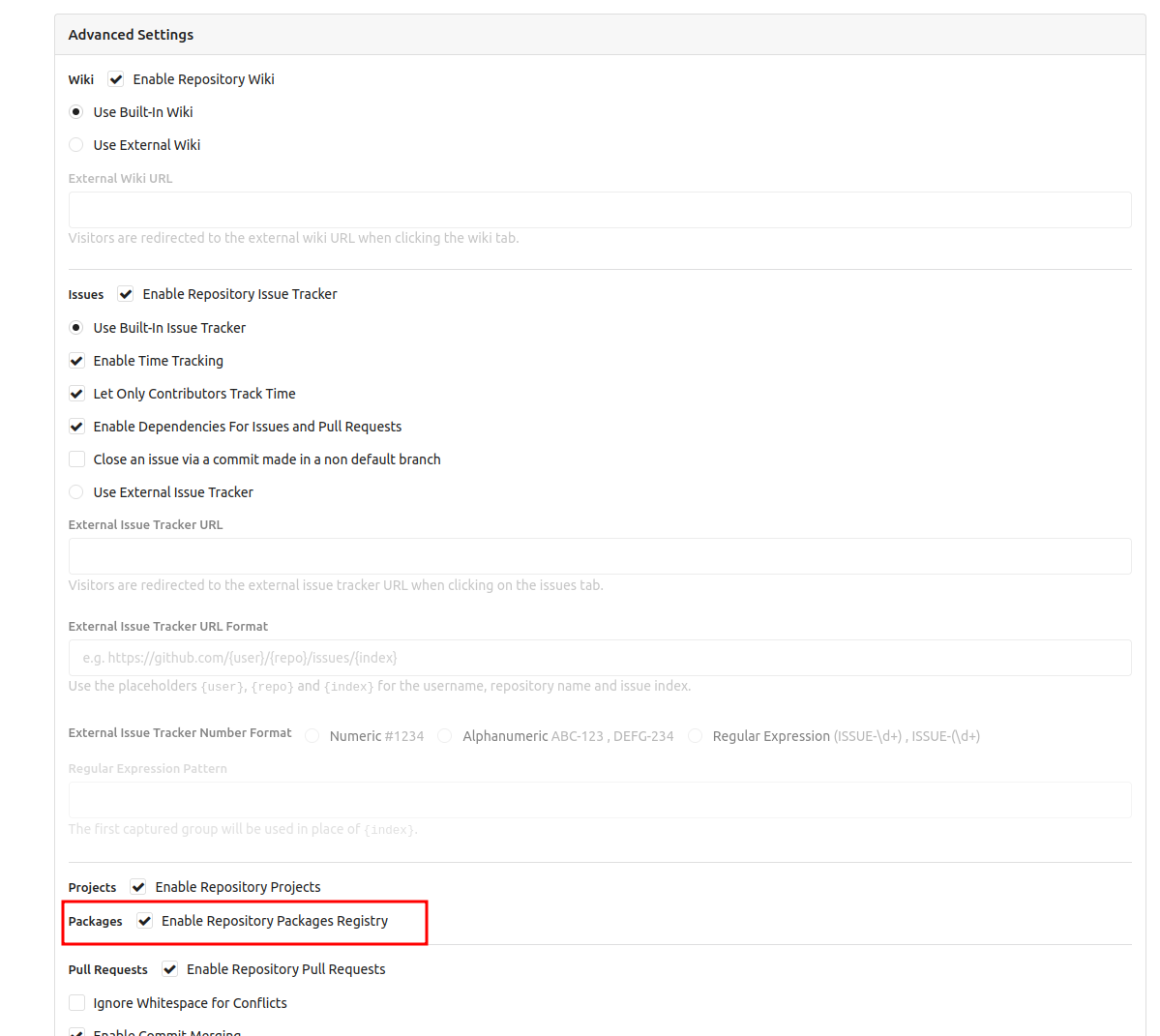
Gitea recently added package management which means that compiled packages and docker containers can be stored alongside code - super useful. By default package hosting is turned off but you can turn it on per-project in the advanced settings section in your project settings:
[](https://wiki.jamesravey.me/uploads/images/gallery/2022-10/5pTimage.png)
# CLI Development
Simon Willison has some [really interesting/useful advice ](https://simonwillison.net/2023/Sep/30/cli-tools-python/)for building command lines ([mirror](https://archive.jamesravey.me/archive/1696190222.759702/index.html)).
I took a copy of his cookie cutter template and put it [here](https://git.jamesravey.me/ravenscroftj/click-app)
# FastAPI
# FastAPI Logging
Inspired by [https://stackoverflow.com/questions/63510041/adding-python-logging-to-fastapi-endpoints-hosted-on-docker-doesnt-display-api](https://stackoverflow.com/questions/63510041/adding-python-logging-to-fastapi-endpoints-hosted-on-docker-doesnt-display-api)
Set up your logger configuration
```python
from pydantic import BaseModel
class LogConfig(BaseModel):
"""Logging configuration to be set for the server"""
LOGGER_NAME: str = "mycoolapp"
LOG_FORMAT: str = "%(levelprefix)s | %(asctime)s | %(message)s"
LOG_LEVEL: str = "DEBUG"
# Logging config
version = 1
disable_existing_loggers = False
formatters = {
"default": {
"()": "uvicorn.logging.DefaultFormatter",
"fmt": LOG_FORMAT,
"datefmt": "%Y-%m-%d %H:%M:%S",
},
}
handlers = {
"default": {
"formatter": "default",
"class": "logging.StreamHandler",
"stream": "ext://sys.stderr",
},
}
loggers = {
LOGGER_NAME: {"handlers": ["default"], "level": LOG_LEVEL},
}
```
Import the configuration and use it:
```python
from logging.config import dictConfig
import logging
from .config import LogConfig
dictConfig(LogConfig().dict())
logger = logging.getLogger("mycoolapp")
logger.info("Dummy Info")
logger.error("Dummy Error")
logger.debug("Dummy Debug")
logger.warning("Dummy Warning")
```
# SQLAlchemy and MySQL
###
Install dependencies for SQLalchemy and MySQL:
```bash
pip install sqlalchemy pymysql python-dotenv
```
Set up a `.env` file containing your DB creds:
```
SQL_HOST=localhost
SQL_PASSWORD=blahblah
SQL_USER=readonly
SQL_DB=my_database_name
```
Once you have set up your .env file you can load it into your python script
```python
import os
import sqlalchemy
import dotenv
dotenv.load_dotenv()
engine = sqlalchemy.create_engine(f"mysql+pymysql://{env['SQL_USER']}:{env['SQL_PASSWORD']}@{env['SQL_HOST']}/{env['SQL_DB']}")
query = """SELECT * FROM table_name WHERE col1="blah" LIMIT 1000"""
with engine.connect() as conn:
df = pd.read_sql(query, conn)
df.head()
```
# Django
Working with the [Django web framework](https://www.djangoproject.com/) and associated libraries
# Deploying Django Apps
### Packaging a Django App in Docker
I [wrote a blog ](https://wiki.jamesravey.me/Serving%20Django%20inside%20Docker%20the%20Right%20Way)about packaging django apps up for shipping in docker.
### Check Utility
Use the `manage.py check` command to ensure that your site is ready for prod usage.
### Resources
[Deploy A Site Live - Matt Layman](https://www.mattlayman.com/understand-django/deploy-site-live/) ([mirror](https://archive.jamesravey.me/archive/1705845709.513886/index.html))
# Django and PostgreSQL
When working with Django and PostgreSQL it is typically best to use the `psycopg[binary]` package:
```bash
pip install psycopg[binary]
```
#### Migrating From Integer to Duration
If you need to migrate from an integer to a duration column you need to manually tell Postgres what unit of time to use - it won't assume that you mean seconds or minutes etc. Here is an example excerpt from a Gastronaut migration.
```python
class Migration(migrations.Migration):
dependencies = [
migrations.swappable_dependency(settings.AUTH_USER_MODEL),
('recipe_app', '0002_nurishifyprofile'),
]
operations = [
migrations.AlterField(
model_name='nurishifyprofile',
name='user',
field=models.OneToOneField(on_delete=django.db.models.deletion.CASCADE, related_name='profile', to=settings.AUTH_USER_MODEL),
),
# workaround for migrating postgres
migrations.RunSQL(
"ALTER TABLE recipe_app_recipe ALTER COLUMN cooking_time TYPE interval USING cooking_time * interval '1 second'",
reverse_sql=migrations.RunSQL.noop
),
migrations.AlterField(
model_name='recipe',
name='cooking_time',
field=models.DurationField(),
),
```
#### Testing with Django and Postgres in Gitea Actions
I [wrote a blog post ](https://brainsteam.co.uk/2024/01/20/gitea-forgejo-actions-and-postgresql-tests/)about testing Postgres-based django apps in Gitea. The TL;DR is effectively to install and configure the postgresql server in the runner image like so:
```yaml
name: Run Tests
run-name: ${{ gitea.actor }} is testing out Gitea Actions 🚀
on: [push]
jobs:
run_tests:
runs-on: ubuntu-latest
container: catthehacker/ubuntu:act-latest
steps:
- name: Checkout Codebase
uses: actions/checkout@v3
- name: Configure and install postgres
run: |
apt update
apt install -y postgresql
service postgresql start
sudo -u postgres -s psql -U postgres -d postgres -c "alter user postgres with password 'test123';"
- uses: pdm-project/setup-pdm@v3
with:
python-version: 3.10
token: ${{ secrets.GH_TOKEN }}
- name: Install dependencies
run: cd ${{ gitea.workspace }} && pdm install
- name: Run Django tests
env:
DB_HOST: 127.0.0.1
DB_NAME: gastronaut
DB_USER: postgres
DB_PASSWORD: test123
run: |
cd ${{ gitea.workspace }} && pdm run manage.py test
```
# Python Packaging
### Overview
Historically Python packaging has been a bit of a mess. There were lots of different tools that did some things well and other things very poorly and distributing applications that use Python was a pain.
In 2021, I wrote a detailed post about Python package managers and environment managers and the pros and cons of each. At the time, I made recommendations around Miniconda, [PDM](https://notes.jamesravey.me/Software/PDM) and Poetry. For pure Python projects (that didn't require specialised C libraries or Nvidia toolkits) Poetry remained the best tool until very recently.
####
### UV: The Modern Solution
Within the last 12 months the whole landscape has shifted. [uv](https://docs.astral.sh/uv/) is now the reigning champion when it comes to all things Python packaging related.