# 🌱 Seed Propagator
# Climate and Eco
# Home Page
Welcome to the digital garden of [James Ravenscroft](https://jamesravey.me). This site is where I keep my notes in progress, some of the material is not fully fleshed out and some of the fleshed out work may be a bit rough around the edges. More polished work can be found on [my main blog site.](https://brainsteam.co.uk)
### Topics:
- 👨💻 [Software Engineering](https://wiki.jamesravey.me/shelves/software-and-devops "Software Engineering")
- 📈 [AI and ML](https://wiki.jamesravey.me/books/ai-and-ml/page/ml-introduction "ML Introduction")
- [☕ Coffee](https://wiki.jamesravey.me/books/seed-propagator/page/coffee "☕ Coffee")
- 🎮 [Gaming](https://wiki.jamesravey.me/books/seed-propagator/page/gaming "Gaming")
- 🎷 [Music](https://wiki.jamesravey.me/books/music-general/page/music-home "Music Home")
- 🧠 [Learning, Knowledge and Mental Health](https://wiki.jamesravey.me/shelves/learning-and-knowledge "Learning and Knowledge")
- 🕸️[ IndieWeb & Federation](https://wiki.jamesravey.me/books/seed-propagator/page/indieweb "IndieWeb")
- [☀️🤖 Home Automation and Solar](https://wiki.jamesravey.me/books/home-automation "Home Automation")
# ☕ Coffee
### Good UK Coffee Merchants
#### [**Hayling Island Coffee Society (HICS), Portsmouth**](https://www.hics.biz/)
A local (to me), independent coffee roaster on Hayling Island just north of Portsmouth, Hampshire
**Notable Blend:** HICS Volcano Island - a strong dark roast similar to [Taylors Hot Java Lava](https://www.taylorsofharrogate.co.uk/house-blends/hot-lava-java)
#### [**Wonky Coffee Company, London/Online**](https://wonkycoffee.com/)
An online retailer selling coffee salvaged from coffee shops + houses in London. They sell beans and aluminium pods (the latter of which can be recycled with a [Dualit ecopress](https://www.oddcoffeeco.com/products/dualit-ecopress))
#### [**The Mecca, Aberystwyth, Wales**](https://www.facebook.com/themecca.aberystwyth/)
An independent Tea & Coffee trader in Aberystwyth, Wales where I did my undergrad degree.
# Personal Knowledge Management
# Fediverse
I am a member over at [Fosstodon](https://wiki.jamesravey.me/fosstodon.org/).
### New to the Fediverse?
This guide written by Axbom has got you covered: https://axbom.com/mastodon-guide/
### Who should I follow?
[https://fedi.directory/](https://fedi.directory/) is a really cool list of interesting accounts that you could follow.
### What tools are there?
As [this toot ](https://mastodon.social/@youronlyone/109253947334406723)says there are a huge number of apps that work on the Fediverse:
[\#Friendica](https://mastodon.social/tags/Friendica) - better [\#Facebook](https://mastodon.social/tags/Facebook)
[\#Funkwhale](https://mastodon.social/tags/Funkwhale) - like [\#Spotify](https://mastodon.social/tags/Spotify) and [\#SoundCloud](https://mastodon.social/tags/SoundCloud)
[\#Lemmy](https://mastodon.social/tags/Lemmy) - like [\#Reddit](https://mastodon.social/tags/Reddit)
[\#PixelFed](https://mastodon.social/tags/PixelFed) and [\#PeerPx](https://mastodon.social/tags/PeerPx) - better [\#Instagram](https://mastodon.social/tags/Instagram)
[\#PeerTube](https://mastodon.social/tags/PeerTube) - like [\#YouTube](https://mastodon.social/tags/YouTube) and [\#Vimeo](https://mastodon.social/tags/Vimeo)
[\#Mastodon](https://mastodon.social/tags/Mastodon) and [\#Pleroma](https://mastodon.social/tags/Pleroma) - better [\#Twitter](https://mastodon.social/tags/Twitter)
[\#BookWyrm](https://mastodon.social/tags/BookWyrm) and [\#Inventaire](https://mastodon.social/tags/Inventaire) - like [\#Goodreads](https://mastodon.social/tags/Goodreads)
[\#distbin](https://mastodon.social/tags/distbin) - like [\#Pastebin](https://mastodon.social/tags/Pastebin)
[\#MissKey](https://mastodon.social/tags/MissKey) - better [\#Twitter](https://mastodon.social/tags/Twitter) and [\#Facebook](https://mastodon.social/tags/Facebook) combined
[\#Nextcloud](https://mastodon.social/tags/Nextcloud) - better [\#Dropbox](https://mastodon.social/tags/Dropbox), [\#Onebox](https://mastodon.social/tags/Onebox), [\#GoogleDrive](https://mastodon.social/tags/GoogleDrive)
[\#Owncast](https://mastodon.social/tags/Owncast) - live streaming
[\#WriteAs](https://mastodon.social/tags/WriteAs) and [\#Plume](https://mastodon.social/tags/Plume) - [\#Medium](https://mastodon.social/tags/Medium) and hosted [\#WordPress](https://mastodon.social/tags/WordPress) on steroids
# Bookmarks
- [Clickbait Challenge at SemEval 2023 - Clickbait Spoiling](https://pan.webis.de/semeval23/pan23-web/clickbait-challenge.html) (retrieved at: 02/11/2022, 07:56:18)
- [Crate List - Blessed.rs](https://blessed.rs/crates) (retrieved at: 04/11/2022, 18:52:22)
- [conversationbot.py - python-telegram-bot v20.0a4](https://docs.python-telegram-bot.org/en/v20.0a4/examples.conversationbot.html) (retrieved at: 06/11/2022, 17:38:32)
- [ You Aren't Learning If You Don't Close the Loops - Commoncog](https://commoncog.com/no-learning-dont-close-loops/) (retrieved at: 07/11/2022, 07:48:45)
- [Sophia: "Alt text is a lot easier when you know how to wri…" - glitterkitten](https://glitterkitten.co.uk/@doot/109296240873900743) (retrieved at: 07/11/2022, 08:40:55)
- [Enhanced support for citations on GitHub | The GitHub Blog](https://github.blog/2021-08-19-enhanced-support-citations-github/) (retrieved at: 07/11/2022, 14:29:09)
- [PyScript | Run Python in your HTML](https://pyscript.net/) (retrieved at: 07/11/2022, 22:55:53)
- [The God Endpoints will continue until morale improves](https://www.swyx.io/god-endpoints) (retrieved at: 08/11/2022, 08:00:01)
- [Getting Senpai To Notice You](https://www.swyx.io/notice-me) (retrieved at: 08/11/2022, 08:00:52)
- [Exploratory Data Alex: "The train-test split thing is for predictive mode…" - Mastodon](https://mastodon.social/@alexkyllo/109312436838492005) (retrieved at: 09/11/2022, 06:38:37)
- [A curated list of command-line utilities written in Rust · GitHub](https://gist.github.com/sts10/daadbc2f403bdffad1b6d33aff016c0a) (retrieved at: 09/11/2022, 08:03:29)
- [Flows - BullMQ](https://docs.bullmq.io/guide/flows) (retrieved at: 10/11/2022, 07:52:29)
- [Datasette: An open source multi-tool for exploring and publishing data](https://datasette.io/) (retrieved at: 11/11/2022, 07:38:39)
- [Pricing | Railway](https://railway.app/pricing) (retrieved at: 17/11/2022, 07:43:47)
- [Writing a Tufte-book in Markdown | Brain Baking](https://brainbaking.com/post/2022/11/writing-a-tufte-book-in-markdown/) (retrieved at: 17/11/2022, 23:22:45)
- [Today I Learned / Lee Byron](https://leebyron.com/til/) (retrieved at: 19/11/2022, 16:09:55)
- [Learn In Public](https://www.swyx.io/learn-in-public/) (retrieved at: 19/11/2022, 16:14:43)
- [Nutella Christmas Tree! - Jane's Patisserie](https://www.janespatisserie.com/2022/11/18/nutella-christmas-tree/) (retrieved at: 19/11/2022, 17:04:09)
- [GitHub - illacloud/illa-builder: An open-source low-code Platform for Developers.](https://github.com/illacloud/illa-builder) (retrieved at: 20/11/2022, 09:39:08)
- [Home - Made With ML](https://madewithml.com/) (retrieved at: 21/11/2022, 08:24:08)
- [Making the IndieWeb more approachable – Tracy Durnell](https://tracydurnell.com/2022/11/27/making-the-indieweb-more-approachable/) (retrieved at: 27/11/2022, 21:57:44)
# Gaming
One of my hobbies is video gaming. I recently got my hands on a Steam Deck which I would describe as a "Nintendo Switch Pro". I've been very impressed with the capabilities of the system.
### Watch List
- [The Store is Closed: Infinite Furniture Store Survival Game](https://www.kickstarter.com/projects/ziggygamedev/the-store-is-closed-infinite-furniture-store-survival-game) - this game looks really interesting - I often feel like IKEA is some kind of supernatural Eldritch place IRL anyway.
# Webmentions
Webmentions are a way for IndieWeb folks to notify each other that something has happened, they use microformats internally.
[WebMention.App](https://webmention.app/) provides an API for sending web mentions automatically but you have to know which page you want to send them from. I will probably add a module to [Microcosm](https://wiki.jamesravey.me/books/microcosm/page/intro-to-microcosm "Intro to Microcosm") to check pages and use webmention.app to send mentions.
# Steam Deck
### Proton
Use [ProtonUp](https://github.com/AUNaseef/protonup) to install custom versions of proton on the deck. You can find this in the Software store on the deck's KDE desktop (open up Discover and search `protonup-qt`)
### Heroic Game Launcher
Heroic is a GUI that wraps both Epic and GOG allowing installation of games from both stores. Install Heroic through discover. Heroic can be added as a non-steam game so that it can be used to launch games from other stores in entertainment mode.
###
### Running Rockstar Launcher on SD
[This article](https://www.reddit.com/r/SteamDeck/comments/xhoy9l/red_dead_redemption_2_rockstar_launcher_version/) explains how to run Rockstar Launcher on Steam Deck
# IndieWeb
I've been interested in [IndieWeb](https://indieweb.org/) since I encountered the concept and owning your own data for a long time. My own site [Brainsteam](https://brainsteam.co.uk) uses [micropub](https://micropub.spec.indieweb.org/) and [microsub](https://indieweb.org/Microsub-spec) and can receive [webmentions](https://www.w3.org/TR/webmention/). I use [my own hand-rolled micropub endpoint](https://wiki.jamesravey.me/books/microcosm/page/intro-to-microcosm "Intro to Microcosm") in combination with the [Hugo static site generation framework ](https://gohugo.io/)to manage my web content.
### Making your site Indieweb compliant
I recently discovered [IndieWebify.me](https://indiewebify.me/) which provides a bunch of tools for validating that your site is indie-web ready. I use [Micropub.Rocks ](https://micropub.rocks/)to ensure that my publication endpoint is up to par.
### Micropub & Sub Clients
- I use [Together](https://alltogethernow.io/) for reading my feeds and liking/reposting/replying on my desktop/in-browser
- I use [Indigenous for android ](https://indigenous.marksuth.dev/)when I'm out and about if I want to make a quick post
### Who is on the IndieWeb?
- [ooh.directory](https://ooh.directory/) has a fantastic list of blogs that subscribe partially or wholly to indieweb concepts across a large number of subject matters!
### OpenGraph
- OpenGraph is a stnadard for sharing metadata about web content across different sites, popularised by Twitter.
- In order to test whether your opengraph metadata is rendering correctly you can use this site: [https://www.opengraph.xyz/](https://www.opengraph.xyz/)
# Hypothes.is
Hypothesis is a web annotation tool - you can annotate any page and your comments are then public for others to see (or you can privately annotate stuff)
### Data Ownership
Hypothes.is is an open source project run by a non-profit. They consider all annotations made in public on their platform to be [creative commons public domain](https://creativecommons.org/publicdomain/zero/1.0/) so it seems like they're unlikely to try and do a runner with public data. However, I still have concerns leaving all my annotations in their silo (What if their service goes down and all my annotations disappear overnight?)
### Annotating Archived Content
It's been pointed out in a [couple of places](https://www.zylstra.org/blog/2022/08/22036/) that hypothes.is can be used to annotate data in the internet web archive but what about in my own archive?
Using via.hypothes.is with my own archivebox instance doesn't work but it seems that both the official chrome plugin and the unofficial firefox plugin do work with archivebox if you click through to the single page html you want to view before you activate them.
### Active Hypothes.is Users
Ton Zylstra keeps [a list of active and semi active h users](https://www.zylstra.org/blog/hypothes-is-roll/)
### Interacting with annotations from other sources
[Matthias 'x23' Melcher ](https://x28newblog.wordpress.com/about-2/)has built [a drag and drop thinking/note mapping tool ](http://condensr.de/)which he calls Condensr. Condensr has import and export functionality from a number of sources including hypothes.is, Kindle and Zotero.
The easiest way to get hypothes.is annotations into Condensr is via [Jon Udell's export tool](https://jonudell.info/h/facet/?max=50)
# Plumbing
odds and sods about plumbing maintenance
# Water Hammer
Water hammer is the noise/shockwave generated when water is suddenly stopped/cut off.
Over time it can damage your system doe to the shockwaves along the pipes.
### Source
[https://piperepair.co.uk/2020/07/06/water-hammer-what-it-is-and-how-you-can-stop-it/](https://piperepair.co.uk/2020/07/06/water-hammer-what-it-is-and-how-you-can-stop-it/) ([mirror](https://archive.jamesravey.me/archive/1669619500.014655/singlefile.html))
# Power Flush
A procedure during which your central heating system is drained and cleaning solution is pumped around to displace and sludge which has been generated by corrosion within the system. The procedure should cost between £300-£500 to be done as of Q4 2022. A GasSafe engineer is required to carry out this maintenance procedure in the UK.
###
### Source
[https://www.diyplumbing.co.uk/power-flush-what-is-it-why-do-i-need-it-how-much-is-it/](https://www.diyplumbing.co.uk/power-flush-what-is-it-why-do-i-need-it-how-much-is-it/) ([mirror](https://archive.jamesravey.me/archive/1669619721.790371/singlefile.html))
# Free Open Source Software and Open Culture
# Delightful Software
A curated list of FOSS software that is delightful
[https://delightful.club/](https://delightful.club/)
# Flipping the Bozo Bit
Flipping the bozo bit on someone is a mental trap/antipattern/shortcut whereby we assume the person is a bozo. This could mean that you assume all of their opinions are useless going forward and/or that you treat them like an idiot.
This is an expression I first encountered on Scott Hanselman's Hanselminutes podcast [episode with Kris Nova](https://www.hanselminutes.com/872/hachyderms-kris-nova-on-running-a-mastodon-server) in which they discuss fostering an atmosphere of psychological safety at work. Hanselman and Nova give the example of "there's no such thing as a stupid question" as a place where one might fall into this trap. You should assume that people don't know stuff that might seem obvious to you and that that's ok. We can't know everything. Preventing people from asking stupid questions can result in them having imposter syndrome.
There is an extensive page on this phenomenon over at the [c2 wiki](https://wiki.c2.com/?SetTheBozoBit) which suggests that the usage of the term bozo bit in this context was originally coined by Jim McCarthy in Dynamics of Software Development. It is thought to originate from a copy protection system in early macOS.
# Proton Mail Bridge
Proton Mail Bridge is a tool that allows end users of Proton Mail to send and receive email using traditional protocols (i.e. SMTP and IMAP).
It can be installed and run on a desktop machine but there is an [unofficial docker image ](https://hub.docker.com/r/shenxn/protonmail-bridge)which you can use to run it as a service for applications that need to send automated emails.
In order to use it I created a simple Docker Compose file:
```yaml
version: "2.0"
services:
bridge:
image: shenxn/protonmail-bridge:latest
restart: unless-stopped
volumes:
- /mnt/user/Docker/protonbridge/data:/root
ports:
- 1025:25
- 1143:143
```
1. On first run I did `docker-compose run -i bridge init` which displays a terminal.
2. Enter `login` and use your proton login info
3. now enter `info` and you should be given some credentials for logging in to SMTP and IMAP locally. You can use these for web apps that need to send emails or devices on the same network as your docker host that need IMAP access. Remember to replace the IP address `127.0.0.1` with whatever your docker host's address is.
### TLS Certificate Warnings
You will probably find that downstream applications complain about the TLS certificates on your bridge server being funny when you try to connect. Certificate verification is very useful and should not be turned off if in doubt. I am using both the bridge and the things connecting to the bridge are on my home LAN and I am reasonably confident that there is very limited risk of a man-in-the-middle attack from inside the network so I've turned off TLS verification. If you're connecting to a bridge over the open net I would strongly recommend doing this properly (get the certificates [from the vault](https://github.com/ProtonMail/proton-bridge/issues/50) and add it to your application's trust store properly).
# Extracting Video Transcripts from MS Teams
Sometimes when you're using Teams you want to extract the full video auto-transcript so that you can summarize it or something but it's difficult or impossible to extract the full transcription unless the original author permits you to "Download" it.
Not a problem with this user-script for extracting video transcripts.
### Instructions
1. Install [TamperMonkey](https://www.tampermonkey.net/) in [Firefox](https://addons.mozilla.org/en-GB/firefox/addon/tampermonkey/) or [Chrome](https://chromewebstore.google.com/detail/tampermonkey/dhdgffkkebhmkfjojejmpbldmpobfkfo?hl=en)
2. Open the extension and click "create new script"
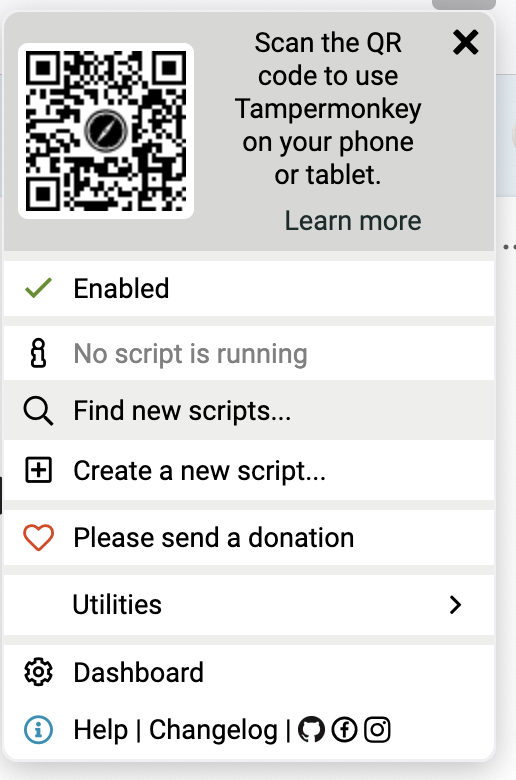
3. Paste the following Script into the editor and click Save
```Javascript
// ==UserScript==
// @name SharePoint Video Transcript Extractor
// @namespace http://tampermonkey.net/
// @version 1.0
// @description Extract transcript data from SharePoint video pages
// @author You
// @match *://*.sharepoint.com/*stream.aspx*
// @match *://*.sharepoint.com/*/stream.aspx*
// @match *://*.sharepoint.com/*/*/stream.aspx*
// @grant GM_setClipboard
// @run-at document-idle
// ==/UserScript==
(function() {
'use strict';
// Create a floating button to trigger the extraction
const extractButton = document.createElement('button');
extractButton.textContent = 'Extract Transcript';
extractButton.style.position = 'fixed';
extractButton.style.top = '10px';
extractButton.style.right = '10px';
extractButton.style.zIndex = '9999';
extractButton.style.padding = '10px';
extractButton.style.backgroundColor = '#0078d4';
extractButton.style.color = 'white';
extractButton.style.border = 'none';
extractButton.style.borderRadius = '4px';
extractButton.style.cursor = 'pointer';
document.body.appendChild(extractButton);
extractButton.addEventListener('click', extractTranscript);
async function extractTranscript() {
// Show extraction in progress
extractButton.textContent = 'Extracting...';
extractButton.disabled = true;
// Find the main list container
const listContainer = document.querySelector('.ms-List');
if (!listContainer) {
alert('Transcript list not found on this page.');
extractButton.textContent = 'Extract Transcript';
extractButton.disabled = false;
return;
}
// Store extracted transcript data
const transcriptData = [];
let processedIds = new Set(); // Track processed entries by ID to avoid duplicates
let noNewContentCounter = 0;
let lastCellCount = 0;
// Keep scrolling and extracting until no new content loads
while (noNewContentCounter < 3) { // Try a few times to ensure we've reached the end
// Extract current visible cells
const currentCells = Array.from(document.querySelectorAll('.ms-List-cell'));
if (currentCells.length === lastCellCount) {
noNewContentCounter++;
} else {
noNewContentCounter = 0;
lastCellCount = currentCells.length;
}
// Process all visible cells
for (const cell of currentCells) {
try {
// Get the list item ID to avoid duplicates
const listItemElement = cell.querySelector('[id^="listItem-"]');
if (!listItemElement) continue;
const itemId = listItemElement.id;
if (processedIds.has(itemId)) continue;
processedIds.add(itemId);
// Extract speaker name - look for the itemDisplayName element
let speakerElement = cell.querySelector('[class*="itemDisplayName"]');
let speaker = speakerElement ? speakerElement.textContent.trim() : '';
// If no speaker found, this might be a continuation from previous speaker
if (!speaker) {
// Try to get speaker from aria label
const ariaLabelElement = cell.querySelector('[id^="timestampSpeakerAriaLabel-"]');
if (ariaLabelElement) {
speaker = ariaLabelElement.textContent.trim().split(' ').slice(0, -3).join(' ');
}
}
if (!speaker) speaker = 'Unknown Speaker';
// Extract timestamp - look for timestamp element
let timestampElement = cell.querySelector('[id^="Header-timestamp-"]');
if (!timestampElement) {
// Try alternative timestamp element
timestampElement = cell.querySelector('[class*="baseTimestamp"] [aria-hidden="true"]');
}
const timestamp = timestampElement ? timestampElement.textContent.trim() : '';
// Extract text content - look for entry text element
const textElement = cell.querySelector('[class*="entryText"]');
const text = textElement ? textElement.textContent.trim() : '';
if (text && !text.includes('started transcription')) {
transcriptData.push({
speaker,
timestamp,
text
});
}
} catch (error) {
console.error('Error processing cell:', error);
}
}
// Scroll down to load more content
const lastCell = currentCells[currentCells.length - 1];
if (lastCell) {
lastCell.scrollIntoView({ behavior: 'smooth', block: 'end' });
// Wait for potential new content to load
await new Promise(resolve => setTimeout(resolve, 1500));
} else {
break;
}
}
// Format the data as text
let formattedText = '';
transcriptData.forEach(item => {
formattedText += `[${item.timestamp}] ${item.speaker}: ${item.text}\n\n`;
});
// Copy to clipboard
GM_setClipboard(formattedText);
// Notify user
extractButton.textContent = 'Copied to Clipboard!';
setTimeout(() => {
extractButton.textContent = 'Extract Transcript';
extractButton.disabled = false;
}, 3000);
// Also show a notification
alert(`Transcript extraction complete!\n${transcriptData.length} entries copied to clipboard.`);
}
})();
(function() {
'use strict';
// Your code here...
})();
```
4. Open the video - if you are inside Teams, click the Open In stream button in the top right to open it in browser

5. With the script enabled, you should see an extra button that says "Extract Transcript", click on it.


7. When it is finished it will pop up and tell you how many lines of dialogue it grabbed. It puts everything in your clipboard.
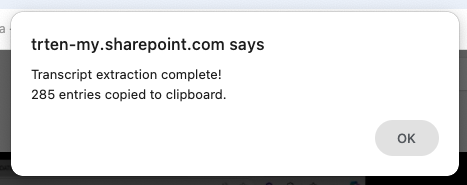
8. Paste your transcript into your favorite LLM and summarize away!