Working with LLMs
- Local LLMs
- LangChain and Zephyr
- Embeddings and Llama.cpp
- PyLLMCore
- ModernBERT
- ColBERT
- Agentic Engineering
Local LLMs
LLM Utility
I'm a big fan of Simon Willison's llm package. It works nicely with llama-cpp.
Installing llm
I didn't get on well with pipx in this use case so I used conda to create a virtual environments for LLM and then installed it in there.
Since I have an NVIDIA card I pass in CMAKE flags to have it build support for cuda:
conda create -y -n llm python=3.10
conda activate llm
pip install llm llm-llama-cpp
CMAKE_ARGS="-DLLAMA_CUBLAS=ON -DCMAKE_CUDA_COMPILER=/usr/local/cuda/bin/nvcc" FORCE_CMAKE=1 llm install llama-cpp-python

# alternatively if no NVIDIA support is available, this works well
# CMAKE_ARGS="-DLLAMA_OPENBLAS=on" FORCE_CMAKE=1 llm install llama-cpp-python
LangChain
LangChain is a FOSS library for chaining together prompt-able language models. I've been using it for building all sorts of cool stuff.
LangChain and Zephyr
Zephyr is pretty powerful and it will quite happily use tools if you prompt it correctly.
Zephyr uses the following prompt template (as explained here):
<|system|>
</s>
<|user|>
{prompt}</s>
<|assistant|>
The system prompt is defined, followed by a user query/request and then we use <|assistant|> to prompt the model to start generating its own output.
Tool Prompt
Here is a tool prompt that I've managed to get working with Zephyr based on the original guide here and corresponding langchainhub prompt here. The interesting and key thing seems to be reminding the model to consider the inputs for the next action on line 23. Without that it would always try to run an action without any inputs.
<|system|>

Respond to the human as helpfully and accurately as possible. You have access to the following tools:

{tools}

Use a json blob to specify a tool by providing an action key (tool name) and an action_input key (tool input).

Valid "action" values: "Final Answer" or {tool_names}

Provide only ONE action per $JSON_BLOB, as shown:

```
{{
  "action": $TOOL_NAME,
  "action_input": $INPUT
}}
```

Follow this format:

Question: input question to answer
Thought: consider previous and subsequent steps. Consider inputs needed for next action.
Action:
```
$JSON_BLOB
```
Observation: action result
... (repeat Thought/Action/Observation N times)
Thought: I know what to respond
Action:
```
{{
  "action": "Final Answer",
  "action_input": "Final response to human"
}}
```

Begin! Reminder to ALWAYS respond with a valid json blob of a single action.

Use tools if necessary.

Respond directly if appropriate.

always pass appropriate values for `action_input` based on the tools defined above.

Format is Action:```$JSON_BLOB```then Observation

Previous conversation history:
{chat_history}
</s>
Question: {input}
{agent_scratchpad}
Embeddings and Llama.cpp
SQLite VSS - Lightweight Vector DB
SQLite VSS is a SQLite extension that adds vector search on top of SQLite. It's based on FAISS1
There are some examples of how to use Pure SQLite VSS on the blog post here
LangChain
You can use SQLite VSS with Langchain which makes it easier to use. The documentation is here for sqlite-vss and here for using llama for embedding.
You need to install sqlite-vss python package to use it via pip install sqlite-vss
Zephyr embeddings
Load the zephyr model with long contet and set gpu layers up.
llama = LlamaCppEmbeddings(model_path="/path/to/models/zephyr-7b-alpha.Q5_K_M.gguf",
            n_batch=512,
            verbose=True, # Verbose is required to pass to the callback manager
            n_ctx=16000,
            n_gpu_layers=32)
NB: I found that Zephyr isn't actually very good for generating embeddings - I suppose this is likely because it is fine-tuned for chatting rather than for embedding.
It actually turns out that the default MiniLM that comes with sentence-transformers does a pretty reasonable job:
embedding_function = SentenceTransformerEmbeddings(model_name="all-MiniLM-L6-v2")
PyLLMCore
PyLLMCore is a python library for working with a variety of LLM models and it supports both OpenAI and Local models.
Setup on Linux
Install the llama-cpp-python library first so that you can ensure that the nvidia dependencies are all pre-configured.
CMAKE_ARGS="-DLLAMA_CUBLAS=ON -DCMAKE_CUDA_COMPILER=/usr/local/cuda/bin/nvcc" pip install llama-cpp-python
pip install py-llm-core
Put models in the correct location
The library seems quite fussy about model location. They must be in the ~/.cache/py-llm-core/models/ folder inside your user profile. Since I am already using SimonW's LLM (as described here) I symlink the zephyr model from there:
ln -s ~/.config/io.datasette.llm/llama-cpp/models/zephyr-7b-alpha.Q5_K_M.gguf\
 ~/.cache/py-llm-core/models/zephyr-7b-alpha.Q5_K_M.gguf
I realised I had done this wrong because I passed in a full filename to a model elsewhere and got an error like this:
Traceback (most recent call last):
  File "/home/james/workspace/raf/llmcore.py", line 24, in <module>
    book = parser.parse(text)
  File "/home/james/miniconda3/envs/raf/lib/python3.10/site-packages/llm_core/parsers.py", line 20, in parse
    completion = self.model_wrapper.ask(
  File "/home/james/miniconda3/envs/raf/lib/python3.10/site-packages/llm_core/llm/llama_cpp_compatible.py", line 65, in ask
    self.sanitize_prompt(prompt=prompt, history=history, schema=schema)
  File "/home/james/miniconda3/envs/raf/lib/python3.10/site-packages/llm_core/llm/base.py", line 29, in sanitize_prompt
    required_ctx_size = len(codecs.encode(complete_prompt, self.name))
LookupError: unknown encoding: /home/james/.config/io.datasette.llm/llama-cpp/models/zephyr-7b-alpha.Q5_K_M.gguf
ModernBERT
The original BERT paper came out in 2018, around 7 years ago at time of writing. However, it is still referred to and used as a strong baseline in a number of NLP tasks. ModernBERT was created by HuggingFace. ModernBERT is a drop-in replacement for use in problems where BERT may have previously been used and like the original, has a base and a large variant.
ModernBERT also outperforms DEBERTA-v3-base which has been a favourite of NLP practitioners for a few years thanks to its few-shot and zero-shot capabilities.
Comparison Table
|
BERT Base
|
ModernBERT Base
|
BERT Large
|
ModernBERT Large
|
|
|---|---|---|---|---|
|
# Params
|
110M
|
149M
|
340M
|
395M
|
|
Context Size
|
512
|
8192
|
512
|
8192
|
|
BEIR
|
38.9
|
41.6
|
38.9
|
44.0
|
|
MLDROOD
|
23.9
|
27.4
|
23.3
|
34.3
|
|
MLDRID
|
32.2
|
44.0
|
31.7
|
48.6
|
|
BEIR (ColBERT)
|
49.0
|
51.3
|
49.5
|
52.4
|
|
MLDROOD (ColBERT)
|
28.1
|
80.2
|
28.5
|
80.4
|
|
GLUE
|
84.7
|
88.5
|
85.2
|
90.4
|
|
CSN
|
41.2
|
56.4
|
41.6
|
59.5
|
|
SQA
|
59.5
|
73.6
|
60.8
|
83.9
|
OOD=out of domain ID=In Domain
mmBERT is a modern multi-lingual encoder-only model based on ModernBERT.
ColBERT
ColBERT is a variation of BERT that is optimised for search/retrieval use cases which uses contextual late interaction. The pun is a name based on
Agentic Engineering
Engineering practices for agentic AI systems
Configuring Custom Models: Vision & Parallel Tool Calls
Overview
This page documents configuration patterns for using custom models (e.g. Qwen, custom fine-tunes) with LiteLLM as a proxy and OpenCode as the agentic frontend.
When using non-standard models, both LiteLLM and OpenCode require explicit configuration to advertise and support advanced capabilities like vision (image input) and parallel tool calls. Without proper setup, these features silently fail.
Vision / Multimodal Support for Custom Models
Configuring image support for custom models in a llama.cpp + LiteLLM + opencode setup.
The Problem
LiteLLM does not infer vision support for arbitrary custom_openai models. OpenCode also performs its own preflight modality check and does not read LiteLLM's supports_vision metadata for custom providers. Both layers must be configured independently.
LiteLLM Side
- Add
supports_vision: trueunder the LiteLLM model'smodel_infoso LiteLLM and its model metadata advertise image capability - LiteLLM's OpenAI-compatible/custom OpenAI chat path does not normally strip OpenAI-style image blocks — it preserves
image_urlcontent and normalizes string image URLs into{ "url": ... }
OpenCode Side
- For opencode custom providers, image support must be declared per model with
modalities.inputincludingimage - If
modalitiesis set, include bothinputandoutput - Without
modalities.input: ["text", "image"], attachments get replaced with an error:ERROR: Cannot read image (this model does not support image input). Inform the user.
Working OpenCode Model Shape
"Qwen3.6-35B-A3B": {
  "name": "Qwen3.6-35B-A3B",
  "limit": {
    "context": 262144,
    "output": 65536
  },
  "modalities": {
    "input": ["text", "image"],
    "output": ["text"]
  }
}
Parallel Tool Calls
Enabling parallel tool calls for a custom model served through LiteLLM, used by OpenCode.
The Problem
The parallel_tool_calls: true in model_info is metadata only — it does not auto-forward to the API. Without explicit pass-through, the downstream server never receives the signal.
OpenCode Side
- No config change needed in
opencode.jsonc - OpenCode uses the AI SDK which auto-detects parallel tool call capability from the provider
- The
tool_callboolean in model config is for declaring tool support, not parallel behavior - Your setup (
jamesravey_litellmprovider with@ai-sdk/openai-compatible) handles this at the SDK level
LiteLLM Side
Fix: Add parallel_tool_calls inside litellm_params:
"litellm_params": {
  ...
  "parallel_tool_calls": true
}
Prerequisites
- LiteLLM must be v1.61.0+ (parallel tool calls pass-through added then)
- The downstream inference server (vLLM, TGI, etc.) must support parallel tool calls
Files Reference
~/.config/opencode/opencode.jsonc— OpenCode model config (no changes needed for parallel tool calls)- LiteLLM model config — add
parallel_tool_callstolitellm_paramsandsupports_vision: truetomodel_info
Loop Engineering
Loop Engineering is a proposed approach to building software whereby an AI agent is used in a validation/feedback loop to essentially validate whether the task is complete yet or not.
The term is believed to have been coined by Addy Osmani, Peter Steinberger and Boris Cherny in June 2026. It is believed that this way of working emerged once agentic AI coding tools crossed a threshold:
Coding agents had become reliable enough to finish a non-trivial task unattended; scheduling primitives had appeared in the major harnesses; and the cost of a single agent run had dropped far enough that running one repeatedly, on a timer, stopped looking wasteful.
Separate Generator and Evaluator Agents
The IEEE working note suggests that it is very important to separate the generator from the evaluator in the loop. The agents that generate code are typically very keen to praise themselves even when a human can plainly see that quality is mediocre. The context for the coding agent is stuffed full of reasons why the code was written in a particular way. So the agent looks at its own reasoning and sees a chain of self persuasion.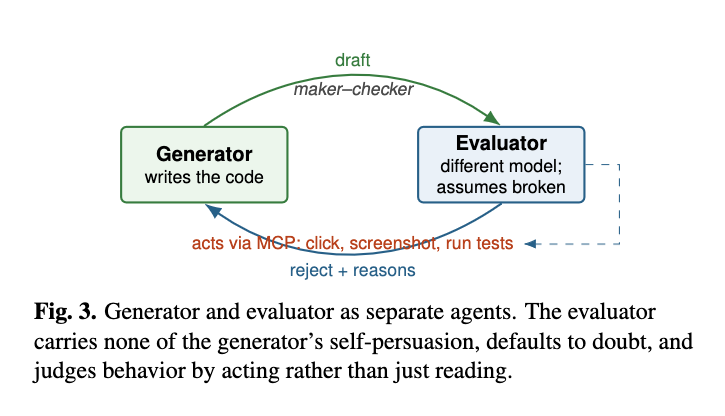
The key is to build an individual independent skeptic rather than trying to train the generator to be self critical. This is a similar architecture to the GAN model.
The evaluator should act, not just read. This implies that the model should do something like run tests, ideally end-to-end tests, that exercise the complete product. But they will also need to give enough feedback and granularity that the agent would know what to do with them afterwards.